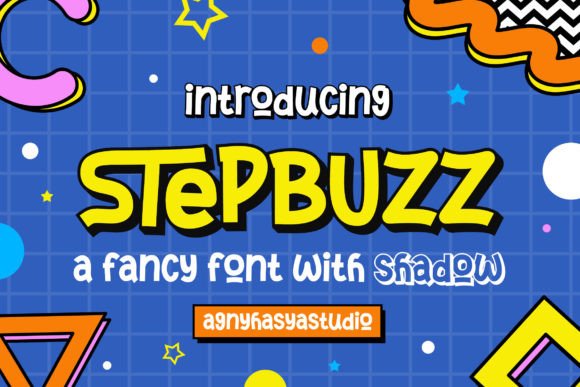
Integrating Stepbuzz: A Strategic Approach to Playful Typography in Professional Workflows
In the landscape of modern design and branding, typography often serves as the silent ambassador of a brand's voice. While minimalism has dominated corporate aesthetics for years, there is a growing shift toward personality-driven design that connects emotionally with audiences. This is where Stepbuzz enters the workflow. More than just a collection of characters, Stepbuzz is a playful, fancy, and fun typeface designed to inject energy into visual communications. However, integrating a display font like this into a professional environment requires more than just installation; it demands a strategic approach to ensure it enhances rather than distracts from the core message.
Stepbuzz comes in two distinct styles: Regular and Shadow. This duality offers immediate versatility for designers who need to establish hierarchy without switching font families. Furthermore, the font is PUA (Private Use Area) encoded, a technical feature that significantly streamlines the creative process by allowing easy access to alternate glyphs and ligatures. For professionals ranging from marketing managers to freelance illustrators, understanding how to leverage these features within an existing production pipeline is key to maximizing the asset's value.
Strategic Placement in the Design Lifecycle
The decision to use a distinctive font like Stepbuzz should not be an afterthought. In a robust design workflow, typography selection occurs during the conceptualization phase, often before a single pixel is pushed in software like Adobe Illustrator or Photoshop. When planning a project—whether it is a new product launch, a rebranding initiative, or a seasonal advertising campaign—Stepbuzz fits best as a primary tool for establishing tone.
Consider the pre-production phase of a branding project. Before finalizing a logo, teams often create mood boards to define the emotional trajectory of the brand. Stepbuzz is particularly effective here for brands targeting a younger demographic or those wishing to appear approachable and innovative. Its playful nature signals creativity, making it an ideal candidate for industries such as confectionery, children's education, entertainment, and lifestyle products. By introducing Stepbuzz early in the brainstorming sessions, stakeholders can visualize how a "fun" aesthetic translates into tangible assets, helping to align expectations before moving into execution.
During the execution phase, the two available styles allow for dynamic layering. The Regular style serves as the foundation for clean legibility, while the Shadow style adds depth and dimension, mimicking retro signage or 3D effects without the need for complex manual styling. This efficiency is crucial when working under tight deadlines. Instead of spending hours creating drop shadows or duplicate layers to achieve depth, a designer can simply toggle between the Stepbuzz styles, maintaining consistency and saving valuable production time.
Maximizing Features Through PUA Encoding
One of the most significant advantages of Stepbuzz in a professional workflow is its PUA encoding. For those unfamiliar with this technical aspect, PUA encoding maps special characters, alternates, and ligatures to specific keys on the keyboard or within the glyph panel of design software. In practical terms, this removes the friction often associated with accessing advanced typographic features.
In many standard fonts, accessing a specific swash or a connected ligature requires navigating complex OpenType panels or copying and pasting characters from a separate legend. With Stepbuzz, these elements are integrated directly into the typing experience. For a content creator producing a high volume of social media graphics or a publisher designing a book cover, this usability factor cannot be overstated. It allows for rapid iteration. A designer can type a word, instantly swap out specific letters for more decorative alternates to improve spacing or visual interest, and see the result in real-time.
This feature also supports consistency across different team members. When multiple designers are working on a single campaign, ensuring that everyone uses the same ligatures and alternates can be challenging. Because Stepbuzz makes these features easily accessible and standardized through its encoding, the risk of human error decreases. The workflow becomes smoother, with less time spent on quality control checks regarding typographic inconsistencies.
Diverse Application Scenarios
The versatility of Stepbuzz allows it to permeate various stages of a business workflow, extending beyond simple logo design. Its application can be categorized by the intent of the communication:
- Branding and Identity: As a logo font, Stepbuzz provides a memorable hook. The shadow style, in particular, works well for badges and emblems where a sense of tradition meets playfulness.
- Advertising and Marketing: In digital ads or print brochures, headlines need to stop the scroll. Stepbuzz's unique character shapes draw the eye, making it effective for call-to-action buttons or promotional headers.
- Packaging and Product Design: On physical shelves, differentiation is vital. Using Stepbuzz on labels or packaging can convey a sense of artisanal quality or fun, distinguishing a product from competitors using generic sans-serif typefaces.
- Editorial and Publishing: For magazine spreads or book covers, particularly in genres like humor, cooking, or travel, Stepbuzz can serve as an impactful title font that sets the mood immediately.
- Event Materials: From invitations to banners, special events benefit from typography that feels celebratory. The ligatures in Stepbuzz can connect letters in a way that feels custom-drawn, adding a premium touch to event collateral.
It is important to note that while Stepbuzz is powerful, it is a display font. In a comprehensive design system, it should interact harmoniously with more neutral body fonts. A common workflow mistake is attempting to use highly stylized fonts for long-form text. To maintain readability and professionalism, pair Stepbuzz with a clean sans-serif or a classic serif for body copy. This contrast ensures that the playful elements of Stepbuzz highlight key information without overwhelming the reader.
Implementation and Technical Compatibility
Integrating Stepbuzz into your existing toolkit requires attention to technical compatibility. Since the font relies on PUA encoding for its full potential, it is essential to verify that your design software supports this standard. Most industry-standard applications, including the Adobe Creative Cloud suite (Illustrator, Photoshop, InDesign) and Affinity Designer, handle PUA encoded fonts seamlessly. However, users working in web-based editors or older software versions may need to utilize specific glyph panels or character map utilities to access the full range of alternates.
For web implementation, converting Stepbuzz into web-font formats (WOFF/WOFF2) requires careful handling of the PUA characters to ensure they render correctly across different browsers. Developers should test the ligatures and alternates in the live environment to guarantee that the playful intent is preserved on mobile and desktop devices. If the goal is to use Stepbuzz strictly for static images (such as banners or social posts), this complexity is minimized, as the design is rasterized before publication.
Organization is another critical component of long-term use. When downloading and installing Stepbuzz, it is advisable to maintain a structured font library. Tagging the font with keywords like "display," "playful," "shadow," and "PUA" in your font management software will speed up retrieval during future projects. This habit supports efficiency, ensuring that when a project brief calls for a "fun yet professional" aesthetic, Stepbuzz is immediately available rather than lost in a disorganized directory.
Quality Control and Long-Term Value
As with any design asset, the longevity of Stepbuzz in your workflow depends on how well it adapts to evolving trends. Playful fonts can sometimes risk appearing dated if overused or applied without context. To mitigate this, use Stepbuzz strategically for campaigns that benefit from a timeless sense of fun rather than fleeting internet memes. The inclusion of both regular and shadow styles helps future-proof the font, as the shadow variant offers a retro appeal that cycles back into fashion regularly, while the regular style remains versatile for cleaner layouts.
Furthermore, the ease of accessing glyphs via PUA encoding means that the font can be refreshed creatively without needing new purchases. By rotating different alternates and ligatures, a brand can keep its visual identity feeling fresh across different seasons or product lines while maintaining core recognition. This flexibility makes Stepbuzz a cost-effective investment for small business owners and freelancers who need to maximize the utility of every asset in their library.
Ultimately, the successful integration of Stepbuzz lies in balancing its exuberant character with disciplined design principles. It is a tool that, when used with intention during the planning and execution phases, can elevate a project from standard to standout. By understanding its technical strengths, respecting its role as a display typeface, and incorporating it into a structured workflow, creators can harness its playful energy to deliver compelling, high-quality results that resonate with their audience.